JavaScript Game Development Engine Ideas
Where the JavaScript game-engine landscape has gaps, and how I'd fill them if I built one.
Before I wrote anything anyone paid me for, I was making Flash games. ActionScript 3, early teens, a handful of them shipped. I moved across to PHP and the web fairly quickly, but the StackOverflow ranking I built up in the AS3 tag is still up there, and the urge to work on games never really left.
Building a full game now isn’t realistic. The skill list is long — art, animation, sound, story, gameplay design — and I’m any good at one of them. Programming is a small slice of what makes a game work, and the rest takes years I no longer have alongside parenting and a full-time job.
Tooling, though, is a different question. Browser games written in TypeScript: I’ve been chewing on ideas there for years, and the current landscape leaves real gaps.
What a game engine actually has to do
Unity is the obvious reference. Out of the box it covers 2D and 3D graphics, animation with sprite sheets and bones, sound, scene management, composable objects, physics and collisions, networking, and scripting. The editor itself is extensible, so teams ship tooling tailored to a specific project and the community publishes plugins that other developers can drop straight in.
That’s the bar. Nothing in JavaScript clears it.
The current landscape
The default framework for JavaScript games is Phaser, and has been for years. I haven’t built anything substantial with it, but the documentation reads like the fundamentals are covered and the developer experience sits somewhere between fine and mildly irritating. Phaser is the framework only — there’s no first-party editor for scene composition. A third-party project, Phaser Editor 2D, tries to fill that gap, but the time I spent with it didn’t convince me.
Assembling your own stack instead, the parts are there. Pixi.js is the mature 2D rendering library and doubles as one of Phaser’s backends. Three.js is the default for 3D, though I haven’t done much work in that space. Matter.js is the 2D physics engine I’ve had the best results with, and it slots into Phaser as a supported option. Howler.js handles sound.
Construct 3 is the closest thing to a complete solution. It’s closed-source, AUD$210 a year, and highly opinionated — you commit to its way of doing things in exchange for a coherent experience.
The shape of all this: the parts exist, but nobody has assembled a holistic editor-plus-engine the way Unity has. The economic reason isn’t a mystery — a JavaScript game ships to the web, the revenue ceiling is lower than a cross-platform Unity release, and the engineering investment that would close the gap hasn’t shown up.
How I’d design my own
If I built one, I’d spend almost all the effort on nailing the fundamentals and then make the engine and tooling aggressively extensible. The community fills the gaps if you give them somewhere to plug in.
Three pieces. The engine itself runs the update loop, executes component code, and handles rendering. The editor is a web UI for setting up scenes, placing objects, attaching and configuring components, managing assets, and saving project state. The third piece is a local development server, running on the developer’s machine, bridging local code, assets, and scene state to the editor over localhost.
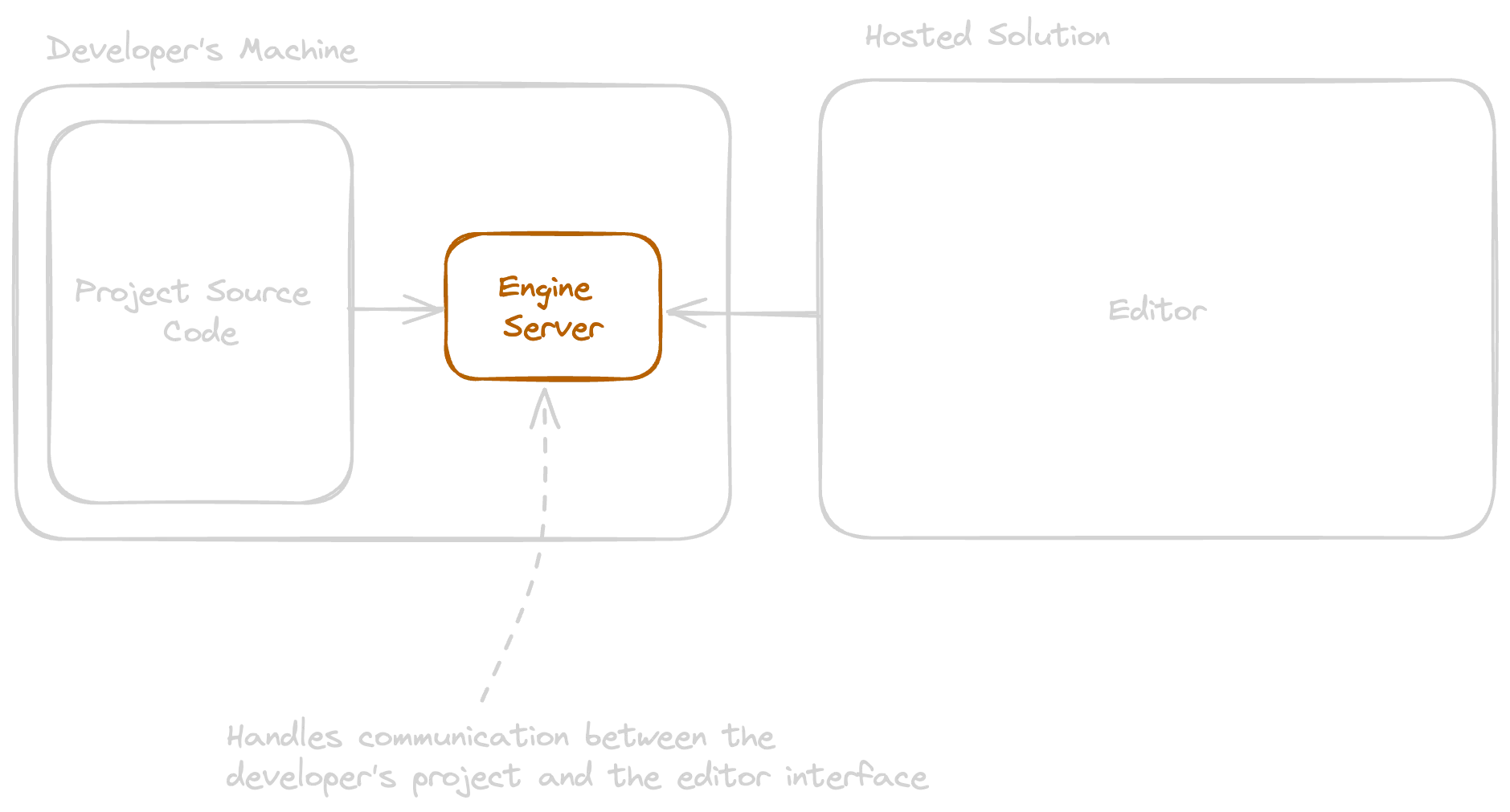
The local server is the unusual choice. It raises the barrier to entry slightly — you have to install and run something — but it pays off by giving the editor a clean, structured channel into the developer’s actual project. The editor knows what components exist, what their attributes are, what assets are available, in real time.
Engine architecture
A handful of concepts.
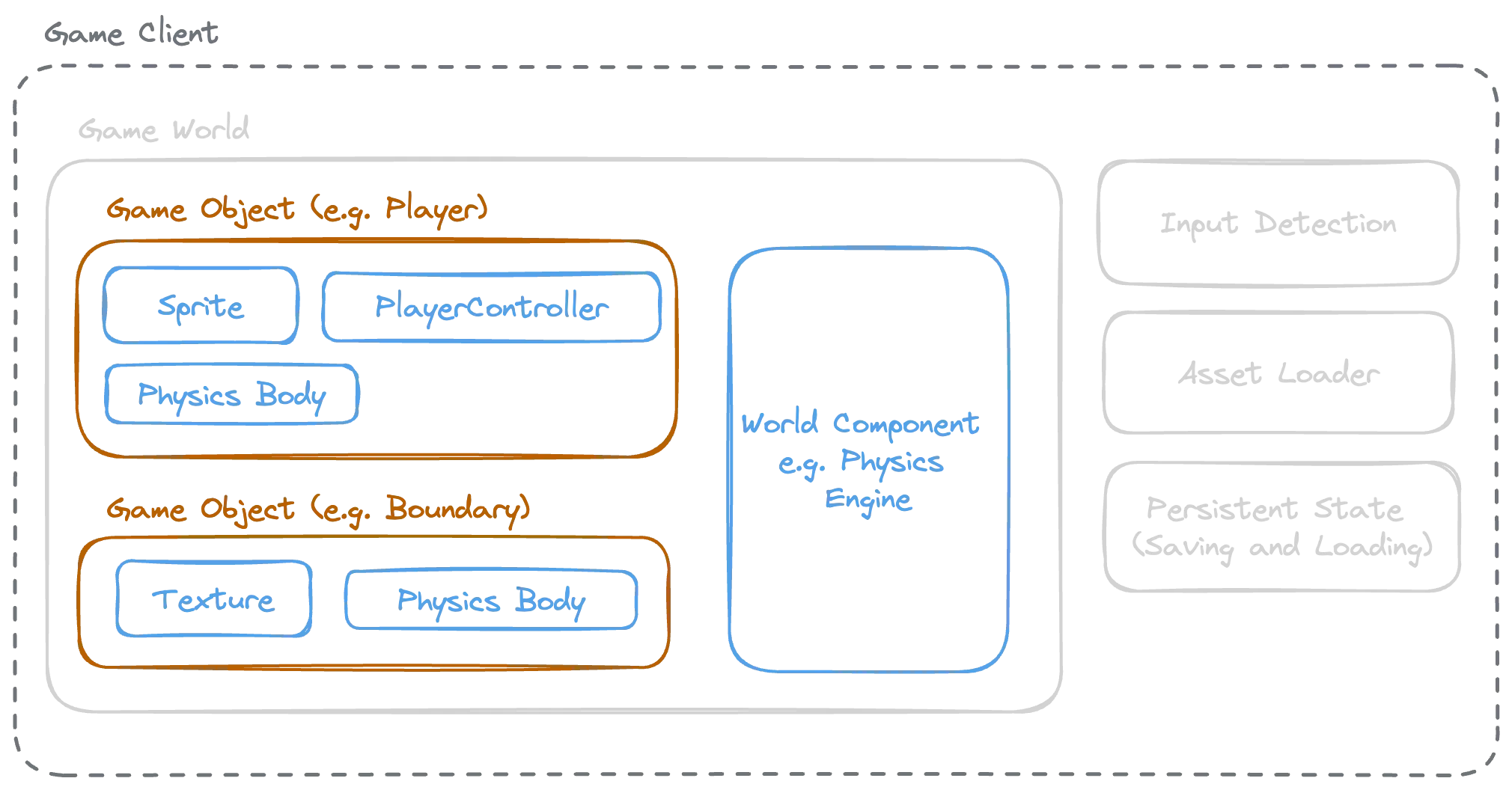
The game client is the layer that handles things outside of gameplay itself — user input, loading assets, swapping scenes in and out.
The game world is where play actually happens. Game objects live in it, collisions happen in it, sound effects fire from it. The meat of a playable game is here.
Game objects are the building blocks of a world. Out of the box they have a 2D position and not much else; components bring them to life. They nest, so a child object’s position is relative to its parent.
Components encapsulate one piece of functionality each and attach to either an object (a sprite, a controller) or to the world itself (a physics engine). Custom behaviour rides on components — the entry point to coding a player isn’t a Player class, it’s a PlayerController component you attach to a generic object.
Components and objects need an API to talk to each other and to query the world. A zombie that chases the player, written against that API, would look something like this:
class ZombieController implements Component<WorldObject> {
  @Attribute({
    defaultValue: 0.03,
    type: () => Float,
    description: 'How fast this zombie moves.',
  })
  public speed!: number;

  @Attribute({
    defaultValue: 1,
    type: () => Int,
  })
  public damage!: number;

  public onUpdate(update: Update): void {
    const player = this.owner.world.getObjectByName('player');
    const distance = update.delta * this.speed;

    this.position.x += Math.cos(this.position.x - player.position.x) * distance;
    this.position.y += Math.sin(this.position.y - player.position.y) * distance;

    if (this.position.distanceTo(player.position) < 50) {
      player.getComponent<PlayerController>('controller').health -= this.damage;
    }
  }
}
The @Attribute decorator tells the editor that a field should be inspectable. The type points to a built-in, custom, or third-party data type, each rendering differently — number pickers, references to other scene objects, asset selectors, whatever the type provides. The local development server is what feeds this metadata to the editor.
The editor
A React UI talking to two things: a central backend for accounts, projects, and shared metadata, and the local development server for code, assets, and scenes. The editor is extensible by component and attribute type, so a third-party component suite can ship with its own tailored editor experience.
What it has to do well:
- Place and arrange objects in a scene.
- Manage components on those objects — rotate and resize sprites, configure physics vertices, set
@Attributevalues on custom components. - Basic asset work — slicing sprite sheets into frames, configuring animations.
- Save and load scene state, locally and to the cloud. Cloud state versions; local state is whatever you’re working on right now.
- Build and reuse blueprints (Unity calls them prefabs) — pre-configured objects you can add via the UI or instantiate at runtime.
- Run and pause scenes for fast iteration, ideally with the ability to tweak objects and components while paused.
Everything I’m hand-waving
Plenty I haven’t thought through. New-project boilerplate with a sensible bundling setup, which isn’t an area I’ve spent much time in beyond basic webpack and esbuild. Documentation, tutorials, the lift required to make any of this approachable to someone who isn’t me. Versioning across the engine, the development server, and the editor — three moving parts that have to stay coherent across upgrades. Managed asset hosting could be a nice add. Backend APIs for managed achievements and player profiles, similarly.
And probably a dozen other things I’d only see once I started.
Whether I ever actually start is unlikely. But writing this down at least gives me somewhere to come back to if a stretch of free time ever shows up.